

Unlike modern gas tanks, where fuel evaporates at levels that wouldn’t be noticeable after several years, some EVs, including Tesla models, deal with a phenomenon called “phantom drain.” But what is it, how significant of a problem does it pose, and how can you prevent it?
What Is Phantom Drain?
Phantom drain, also known as “vampire drain,” refers to the energy lost from an electric car battery when the vehicle is not in use. For some EVs, like my Volkswagen ID.4, it would take a week or two of it being unplugged to see 1-2% energy loss, assuming it was stored in the garage. For others, like my Tesla Model 3 or Y, you could see a loss of less than 1% or so every day.

Initially, Rivian’s vehicles had a larger than expected amount of phantom drain thanks to 12-volt battery issues.
While electric cars “go to sleep” after you leave them parked for a while, there is still some activity going on. For example, battery management systems (BMS) are keeping the battery at an ideal temperature. For Tesla specifically, it could be due to the complex nature of Tesla’s software, data reporting to Tesla’s servers, and other features that a more basic EV like the ID.4 doesn’t offer.
All in all, it’s common to lose 2-5% of your battery over a week or so of inactivity. This represents a significant improvement compared to just a few years ago. Though the extent of phantom drain can vary between different vehicle models. If your loss is greater than this, there is likely something going on.
Keep in mind: phantom drain is completely different from battery degradation.
Causes of Phantom Drain
Phantom drain is both normal and expected to a certain extent, if your EV isn’t being charged. However, there are reasons your EV may experience a higher-than-expected rate of battery loss even if you aren’t driving your car.
Battery Management Systems (BMS)
All EVs utilize a BMS to help maintain the battery’s ideal temperature. However, the BMS typically only becomes a significant cause of phantom drain after extended drives or when the vehicle is parked outdoors in extreme weather. This is especially true in both hot summers and very cold winters, as these kinds of temperatures impact how your battery performs.
Safety and Security Features
Certain electric car makers offer built-in video recording security systems, like Tesla’s Sentry Mode and Rivian’s Gear Guard, which use onboard cameras to record nearby activity. This in turn “wakes the car up” when needed. You’ll find these features to drain a good amount of battery if your EV is parked somewhere with a lot of foot traffic, such as a mall or busy office parking lot.
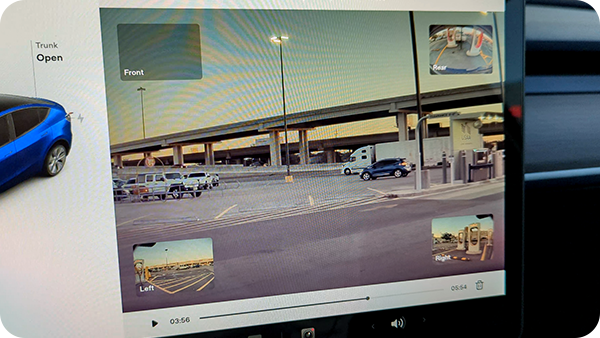
Video captured by Tesla’s Sentry Mode software.
Opening the Mobile App
Car mobile apps are becoming more useful as time goes on. Many electric cars have sophisticated mobile app features, allowing you to do things like view a live camera feed from the interior or exterior of the vehicle, roll the windows down, turn on climate features, and lock or unlock the doors. Even if you don’t complete any of these actions, simply opening the mobile app wakes the vehicle up so it can report its status to you.

The VW ID.4’s mobile app is basic but still requires waking the vehicle to work.
Another issue is that many owners will check in on their EV’s charge while on vacation a few times a day not realizing that they are inadvertently draining power from the battery pack each time they do so. If you do this, you’re increasing the amount of phantom drain that’s occurring that otherwise wouldn’t happen. Therefore, I’d recommend keeping it to every couple of days, unless your car has a very high state of charge and you are only going to be gone for a couple weeks at most.
Third-Party Data Collection Apps
Many EV owners, particularly Tesla owners, are opting for third-party apps like TeslaFi to access vehicle data. These apps offer valuable insights into battery health, driving efficiency, and other useful information. However, it’s important to be aware that these apps typically access your vehicle’s data, which requires your car to wake up. Thankfully, a lot of these data providers have customizable settings that allow you to choose between data accuracy and frequency of connections so that you can minimize any loss.
Phone Bluetooth Connection
If you use the phone as a key (PAAK) feature, it’s possible that your device will maintain a connection to your EV after you exit the vehicle if it remains in ‘close’ proximity. It’s hard to say how close you need to be; however, being within 40-50 feet of your car is likely a short enough distance for this to happen. Some EVs will sleep eventually, but it is something to look out for. I’d recommend just turning your phone’s Bluetooth off after parking.
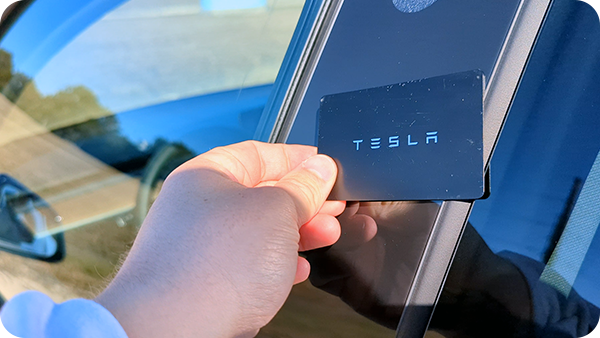
I mostly use my Tesla’s keycard to access and drive the vehicle to avoid PAAK issues altogether.
How to Reduce Phantom Drain
The basic and most effective solution to prevent phantom drain is to let your EV sleep as much as possible. Here are some tips that make this possible:
Temperature Management: Parking in a garage or in the shade can provide protection from extreme temperatures. Consider turning off Tesla’s cabin overheat protection (COP) if you really need the extra range. Keep in mind, cold weather impacts phantom drain more than hot.
Bluetooth Key & Key Fob Proximity: Keep your Bluetooth phone key and key fobs at a distance from your vehicle. Alternatively, I recommend disabling Bluetooth on your phone when it’s not in use.
Monitor App Usage: Only open your EV’s mobile app when necessary, and be sure to close it when you’re finished.
Third-Party Apps: If you use a third-party app like TeslaFi, follow their recommended settings to minimize data pings to your vehicle.
Turn Off Security Software: Don’t forget to exclude your home when using Tesla’s Sentry Mode or Rivian’s Gear Guard, unless you are parking outside and want to have it on. You can remotely deactivate these features using the app if you’re unable to charge and notice significant battery drain.
Utilize Energy-Saving Modes: If your electric car will be parked for an extended period, consider activating an ultra-low power mode, if your EV has one.
Restart Your Vehicle: All software experiences bugs. Sometimes, these bugs can keep your vehicle awake for no reason whatsoever. Restarting your car may do the trick. For Tesla models or Rivian, just hold down the two scroll buttons on the steering wheel at the same time for 10 seconds or so. For other types of EVs, see your manufacturer’s manual on how to do this.
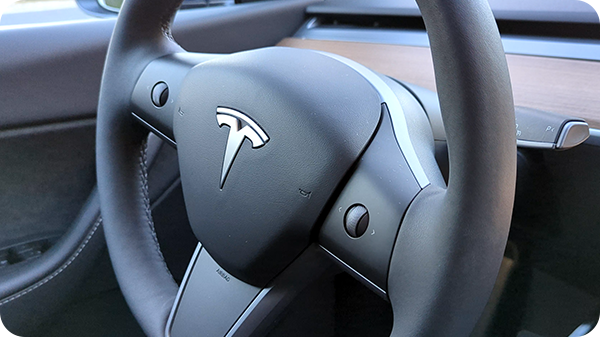
Hold the two scroll buttons on your Tesla steering wheel to reset the car’s software.
Install the Latest Software Updates: Sometimes there are known bugs that may cause phantom drain issues and whether stated specifically or not, you should make sure you install the latest update to check this potential cause off of the list. Additionally, if you have a downloaded update that’s pending install, it may keep your vehicle awake.
Bonus Tip: I once experienced issues with my Tesla constantly attempting to connect to my relatively weak Wi-Fi signal, causing the car to stay awake unnecessarily. To resolve this, I disabled my car’s Wi-Fi connection, except for monthly updates. This issue was related to my internet signal strength rather than the Tesla itself.
Tesla Specific Phantom Drain Tips
All of the information above also applies to Tesla vehicles, but there are a few extra things you can try below.
Turn off Summon Standby Mode: Tesla offers a feature called “Summon” which will allow the vehicle to move remotely without a driver. However, many owners don’t use this feature at all, but it may drain the battery if you leave it on. You can disable this under the autopilot settings.
Disable Data Sharing: Tesla vehicles share tons of data back to the company. This data helps with remote diagnostics, usage behavior and other information. But, like with third-party apps, it requires your vehicle to be awake. You can turn off data sharing under the settings menu (which is found by clicking the car icon in the main menu).
Power Cycle: In case restarting your Tesla didn’t help, the next method you can try is power cycling the vehicle. To do this:
- Make sure the car is in Park.
- Go to Controls > Safety > Power Off.
- Don’t interact or leave the vehicle for at least two minutes (including opening the doors or windows).
- After this, press the brake pedal or open the door to wake the car.
Note: According to Tesla, power cycling should only be done if the touchscreen is responsive and performing normally. If it’s not, you should restart it first by holding down the two scroll buttons on the steering wheel at the same time for 10 seconds or so.
Visit a Service Center or Dealership
If you try all of these, but are still experiencing a large loss in range (greater than ~3% daily), contact Tesla, Rivian, or your dealership to have them check the vehicle out. Sometimes, phantom drain can be a sign of something else going on, like a 12-volt battery issue.

Sometimes a service center is required if your phantom drain issues don’t resolve.
Phantom Drain Is Not a Major Concern
For the most part, phantom drain is overblown. I have left my EVs at the airport for trips over two weeks just to come back and find that they lost an inconsequential amount of range. Car makers have made incredible strides in reducing daily losses with hardware and software optimizations, and this trend is only improving with time. As a result, phantom drain is becoming less of an issue, and for most, it’s already not a significant problem at all.
My phantom drain experience with Tesla was less than 1% per day. My ID.4 is even better, experiencing a loss of about 1% per week. My Rivian was experiencing 2-3% of battery drain a day, but software updates, along with a new 12-volt battery design (one battery instead of two) have vastly improved upon this.
Overall, unless there’s an issue with your vehicle, this is yet another EV concern to put in the “might be greatly exaggerated” category.
Sources