
Tesla has the most reliable charging network in the United States, and perhaps the world. Despite this, almost every Tesla owner is likely to encounter a supercharging issue at some point.
Here are the common causes of these problems, how to fix them, and some other tips to keep in mind.
Why Your Tesla Isn’t Supercharging
When it comes to public charging for all EVs, there are three potential points of failure: the car, the charging stall, and the software that communicates between the two. With Tesla specifically, there may also be online account issues (more on that later).

Sometimes, it can be hard to tell where the issue is stemming from.
In some cases, an individual Tesla charging stall may not be receiving power. In others, there might be an issue with the entire station. On the flip side, your Tesla could have a hardware fault or a malfunctioning charging port.
Finally, the charger or your Tesla’s communication software that ensures safe power levels, might be miscommunicating.
Supercharger Troubleshooting
If you’ve run into a problem while trying to supercharge, here are some troubleshooting tips to try.
Check that the station is being shown as active on your Tesla’s in-vehicle map.
- Keep in mind there’s a chance Tesla’s map software hasn’t been updated yet.

Though uncommon, an entire location of superchargers may be temporarily disabled.
Make sure your Tesla account has an active credit card on file.
- When you use a Supercharger, Tesla bills the credit card on your account automatically.
- If you don’t have one or it’s not active, your session won’t start.
- Currently, there’s no way to pay for Tesla supercharging at the stations themselves.
- If you need to add a credit card, you can do so using the mobile app or by going to tesla.com/teslaaccount.
If you just bought your Tesla, double-check that it is shown in your account.
- To use a Supercharger, your vehicle must be displayed in your Tesla account.
- This often happens if you bought used from a third party.
- If you don’t see the vehicle in your online account, contact the seller or reach out to Tesla.
Check the charger for obvious damage.
- Rarely, a Supercharger may have bent connector pins or other damaged components. If this is the case, it’s not safe to use and has likely disabled itself.
- Check the handle and cable for damage, too.

This supercharger plug is showing significant signs of damage.
Wipe off the charge port or charger.
- It’s possible (though not likely) some dirt or debris might be keeping the connector from attaching to the charge port correctly.
- See if there’s anything obvious you can wipe off.
Related Reading: Can You Charge a Tesla, EVs During Rain or Lightning?
Change to another open stall.
- If none of the above solutions work, it might just be a faulty or disabled charger, and you’ll need to try another one.
- Keep in mind that Tesla Superchargers share a power source based on a numbering system of “1A, 1B, 2A, 2B,” and so on.
- If you are currently attempting to charge with stall 1A and are having issues, it’s likely that stall 1B will have issues as well.
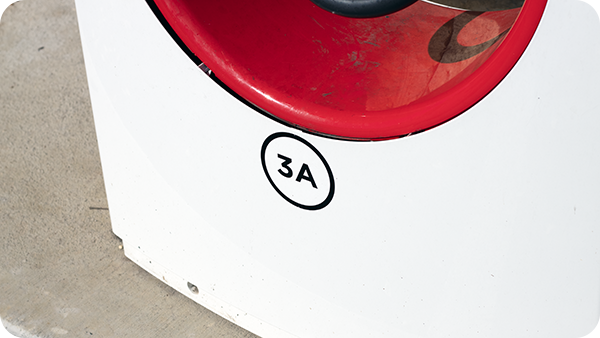
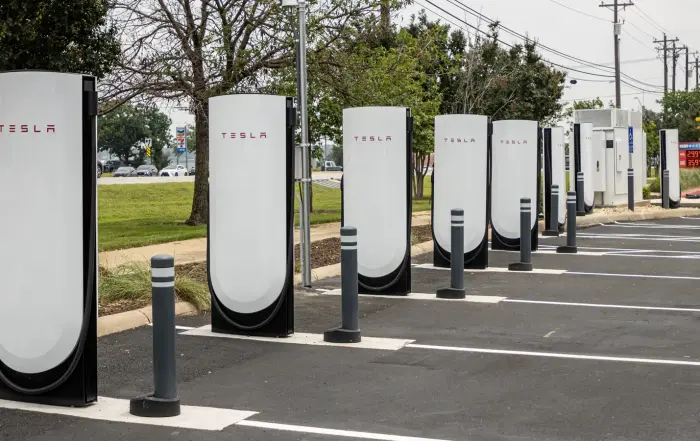
Superchargers with “A”, “B”, “C”, etc. share a power source.
Reset your Tesla.
- To perform a reset, press and hold your foot on the brake while simultaneously pressing both scroll buttons on the steering wheel. Continue holding until the screen(s) turn black and the Tesla logo appears on the center screen.
- After the screen(s) come back on, try charging again.

Press and hold both of the scroll wheel buttons for a few seconds with your foot on the brake to reset your Tesla.
If all of this fails, it’s possible that the entire station is experiencing downtime, especially if no one else is charging, or your Tesla has a hardware issue.
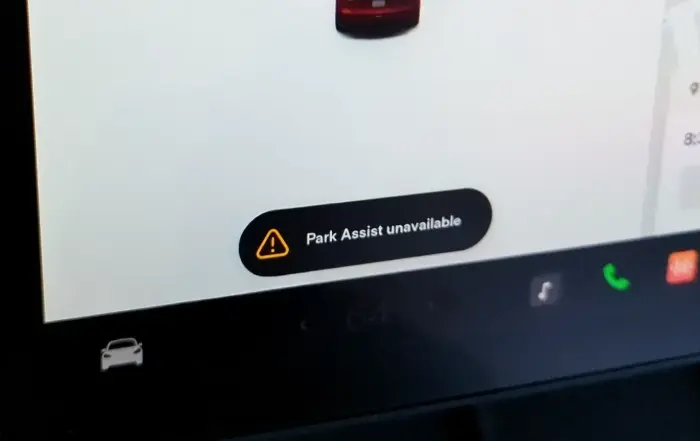
Related Reading: Tesla Park Assist Unavailable: Why it Happens & How to Fix
Your Charging Hardware May Be Faulty
If you have attempted to charge your Tesla at different locations, reset your car, and your Tesla account is set up properly, your car may be experiencing a hardware malfunction. At this point, the only solution is to have Tesla service take a look at it.

If your charging issues are hardware related, you’ll have to visit a service center.
You can make a service appointment through the Tesla app or stop by one of their service centers. While Tesla vehicle charging components can fail, this isn’t a common issue.
Teslas are charged and tested prior to customer delivery. Of course, in between that time, there’s always a small chance something has gone wrong.
Related Reading: Tesla Maintenance Costs & Warranty Information
Why Is Supercharging Slow?
If you aren’t getting the charging speeds you expected based on your Tesla’s charging curve and the stall’s output limit, it most commonly means the unit is not receiving full power or there is a software problem.

Slow charging sessions are either chargers with power supply problems or software glitches.
If this issue is being caused by software miscommunications, unplugging and re-plugging back in works surprisingly well. However, if the charging rate remains low, it’s likely a hardware issue, and you should try changing to another stall if possible.
Additional Supercharging Tips
Here’s some extra charging advice that may save you some headaches in the future.
Try Supercharging Immediately After Delivery
One tip I give every EV owner is to drive to a DC fast charger (which is what Superchargers are) and try to initiate a charging session immediately after taking delivery of your vehicle.

Charging session information is displayed both in the Tesla app, as well as on the screen(s) in your vehicle.
This will help make sure everything is working properly. You don’t want to find out that your Tesla can’t charge in the middle of a road trip. Also, don’t assume that if you can charge at home, you can also supercharge on the road. The two processes are different.
Don’t Plug In and Immediately Walk Away
Even if you believe that you fixed the issue or the equipment is working properly, always watch the charging session for a few minutes prior to leaving your car.
I’ve personally experienced problems in the past where a session seems fine for a minute or two and then all of a sudden speeds drop dramatically, or charging stops altogether.

Charging issues can occur at any time, including a couple of minutes after plugging in.
If this happens, usually it’s something with the charger and I’ve always been able to fix it by changing stalls. However, running back out to your car to address a charging issue can be time-consuming.
Periodically Check In on Your Charging Session
Like the tip above, it’s also possible that 10, 15, or even 20 minutes in, charging stops or becomes very slow. EVs have charging curves and the higher the state of charge your battery is, the slower the power output will be in order to protect the battery. That’s normal.
What’s not normal is being at 40% state of charge and seeing your power rate drop suddenly from 100 kW to 10 kW. It’s always good to keep an eye on the session the entire time you’re charging to make sure everything is working properly.
Related Reading: EVs in Cold Weather: What to Know & Tips
Use Tesla’s Battery Preconditioning Feature
Tesla’s market-leading software has a function built in that will automatically precondition your battery when you are navigating to a Supercharger so that you’ll get the fastest speeds possible. Therefore, you should always put the Supercharger location into the navigation, even if you know how to get there.
Related Reading: How Much Does it Cost to Charge a Tesla?
Sources
Related Articles